> ## Documentation Index
> Fetch the complete documentation index at: https://docs.getstell.com/llms.txt
> Use this file to discover all available pages before exploring further.
# The template editor
> Design how your program's passes look in Apple Wallet and Google Wallet
Every program has a **pass template** — the design and content that all of its passes inherit: colors, logo, images, text fields, and barcodes. The template editor lets you fine-tune it with a live preview.
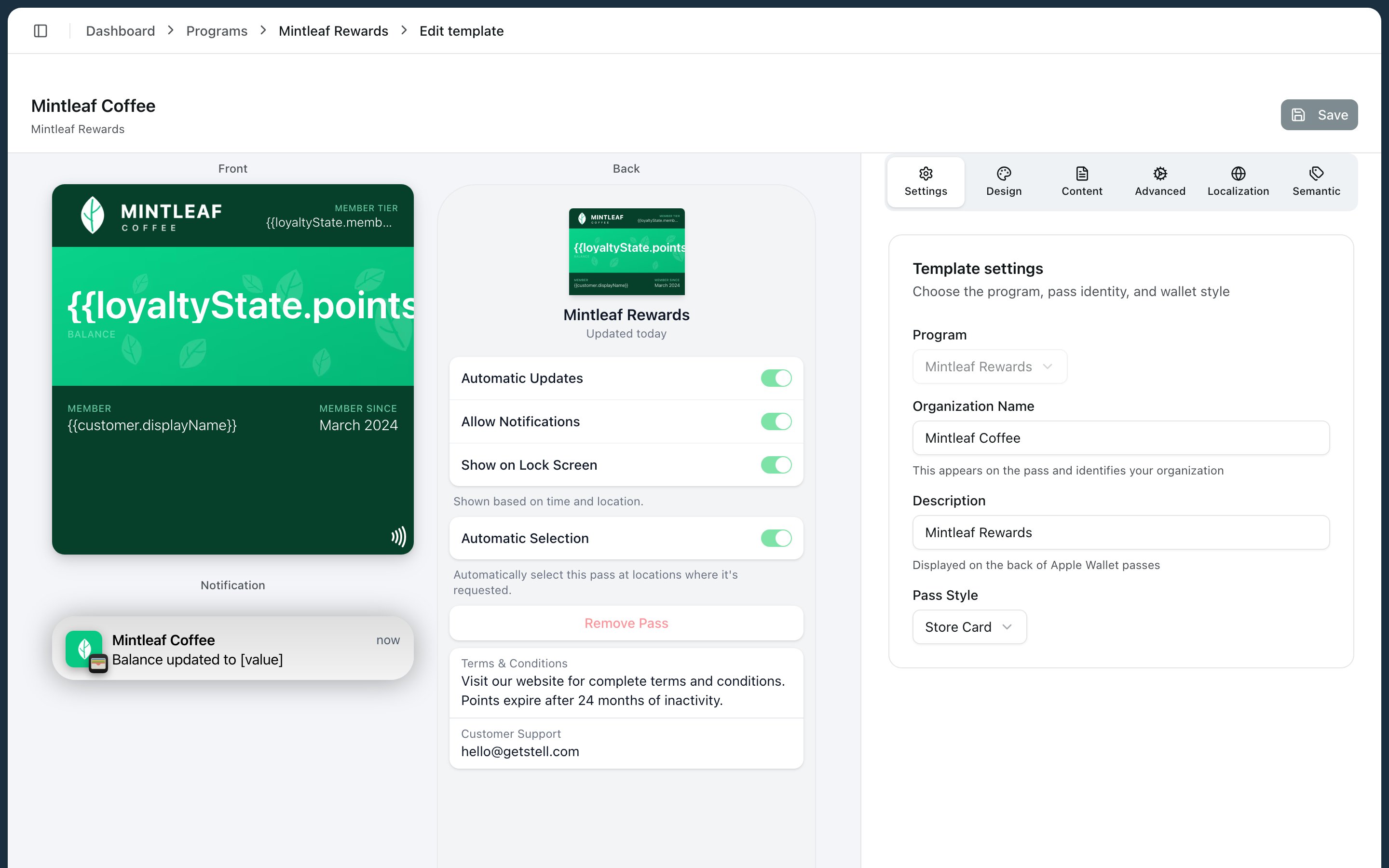 To open the editor, go to your program and click **Edit template** in the **Wallet card template** section.
Before diving into the editor, it pays to understand what you're editing — see the [anatomy of a pass](/pass-templates/anatomy) for how the areas of a pass fit together.
## How the editor works
The left side shows a live preview of your pass — front and back. The right side holds the controls, organized in tabs:
| Tab | What you edit | Details |
| ---------------- | ---------------------------------------------- | ------------------------------------------------------------------------------------ |
| **Settings** | Organization name, description, and pass style | The pass style sets the overall layout — see [anatomy](/pass-templates/anatomy) |
| **Design** | Colors, visual options, and images | See [images](/pass-templates/images) for every slot and its dimensions |
| **Content** | Logo text, the pass fields, and dates | See [fields and dynamic content](/pass-templates/fields) |
| **Advanced** | Barcodes, locations, sharing, and pass actions | See [barcodes and NFC](/pass-templates/barcodes) |
| **Localization** | Translations for each language you support | Organization name, description, logo text, fields, and barcode alt text per language |
| **Semantic** | Structured data the wallet can use | Loyalty, event, or transit details, depending on the pass style |
The fastest way to find the right control is to click the pass itself: click the background to open colors, click an image to open that image's upload, click a field to open its editor.
## Saving changes
1. Make your edits — the preview updates as you go. A colored dot next to the template name warns you about validation issues.
2. Click **Save**. The save dialog summarizes your changes and lists any errors (which block saving) or warnings (which don't).
3. Click **Confirm Save**.
Saving applies your changes to **all existing passes immediately** — every customer's pass updates to the new design, not just passes issued from now on.
Click **Discard** to throw away unsaved changes. If you navigate away with unsaved changes, your browser asks you to confirm first.
## From preview to wallet
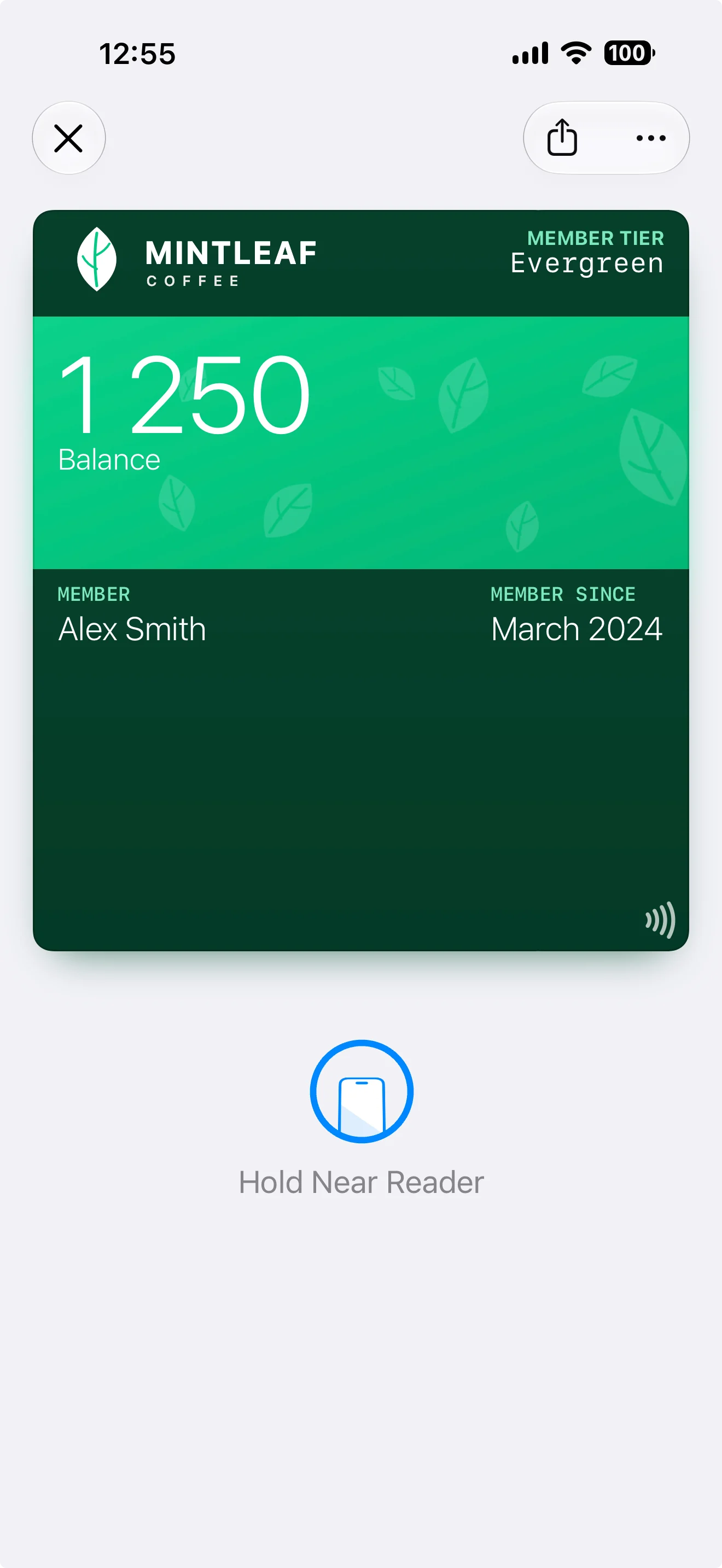
The preview is faithful: what you see in the editor is what customers get on their phone. The same template shown in the editor screenshot above renders like this in Apple Wallet:
To open the editor, go to your program and click **Edit template** in the **Wallet card template** section.
Before diving into the editor, it pays to understand what you're editing — see the [anatomy of a pass](/pass-templates/anatomy) for how the areas of a pass fit together.
## How the editor works
The left side shows a live preview of your pass — front and back. The right side holds the controls, organized in tabs:
| Tab | What you edit | Details |
| ---------------- | ---------------------------------------------- | ------------------------------------------------------------------------------------ |
| **Settings** | Organization name, description, and pass style | The pass style sets the overall layout — see [anatomy](/pass-templates/anatomy) |
| **Design** | Colors, visual options, and images | See [images](/pass-templates/images) for every slot and its dimensions |
| **Content** | Logo text, the pass fields, and dates | See [fields and dynamic content](/pass-templates/fields) |
| **Advanced** | Barcodes, locations, sharing, and pass actions | See [barcodes and NFC](/pass-templates/barcodes) |
| **Localization** | Translations for each language you support | Organization name, description, logo text, fields, and barcode alt text per language |
| **Semantic** | Structured data the wallet can use | Loyalty, event, or transit details, depending on the pass style |
The fastest way to find the right control is to click the pass itself: click the background to open colors, click an image to open that image's upload, click a field to open its editor.
## Saving changes
1. Make your edits — the preview updates as you go. A colored dot next to the template name warns you about validation issues.
2. Click **Save**. The save dialog summarizes your changes and lists any errors (which block saving) or warnings (which don't).
3. Click **Confirm Save**.
Saving applies your changes to **all existing passes immediately** — every customer's pass updates to the new design, not just passes issued from now on.
Click **Discard** to throw away unsaved changes. If you navigate away with unsaved changes, your browser asks you to confirm first.
## From preview to wallet
The preview is faithful: what you see in the editor is what customers get on their phone. The same template shown in the editor screenshot above renders like this in Apple Wallet:
 ## Good to know
* The template belongs to its program — you can't move it to another program from the portal.
* The preview shows the Apple Wallet layout. Google Wallet renders the same template differently — see [Apple Wallet vs Google Wallet](/pass-templates/apple-vs-google).
* Stell creates an initial working template for your program, so you're always improving a working pass rather than starting from a blank canvas.
## Good to know
* The template belongs to its program — you can't move it to another program from the portal.
* The preview shows the Apple Wallet layout. Google Wallet renders the same template differently — see [Apple Wallet vs Google Wallet](/pass-templates/apple-vs-google).
* Stell creates an initial working template for your program, so you're always improving a working pass rather than starting from a blank canvas.