> ## Documentation Index
> Fetch the complete documentation index at: https://docs.getstell.com/llms.txt
> Use this file to discover all available pages before exploring further.
# Event webhooks
> Send a program's pass events to your own systems
**Event webhooks** notify your own systems the moment something happens to a pass, for example when a customer adds their pass to a wallet, or taps it at a terminal. You subscribe an endpoint once, and Stell sends it a small JSON message for each event; delivery, retries, and signing are handled for you.
 Three event types are available:
* **Pass status changed.** Fires each time a pass moves between [lifecycle states](/passes/lifecycle). The most common use is detecting enrollment: when a customer adds their pass to Apple Wallet or Google Wallet, the pass goes from `PREACTIVE` to `ACTIVE`, and that change fires the webhook.
* **Pass created.** Fires the moment a pass is issued, before the customer has added it to a wallet. Use it to mirror new passes into your own systems no matter where they were issued: the portal, an enrollment page, or the API.
* **Transaction created.** Fires when a transaction is recorded against a pass, for example an NFC tap at a terminal.
Subscriptions belong to a program. If you run several programs and want the same events from each, create a subscription on each program. The same endpoint URL works fine, and every delivery says which program it came from.
## Before you start
* **An HTTPS endpoint** that can receive POST requests. The URL must be public; plain HTTP, localhost, and private network addresses are rejected.
* **Which events you need.** For enrollment notifications, **Pass status changed** is enough.
* **Your endpoint's credentials**, if it requires them, for example a bearer token to send in an `Authorization` header.
This page covers setting up the subscription in the portal. Give whoever builds the receiving endpoint the [webhook deliveries](/api-reference/webhooks/deliveries) reference. It documents the exact requests Stell sends.
## Create a subscription
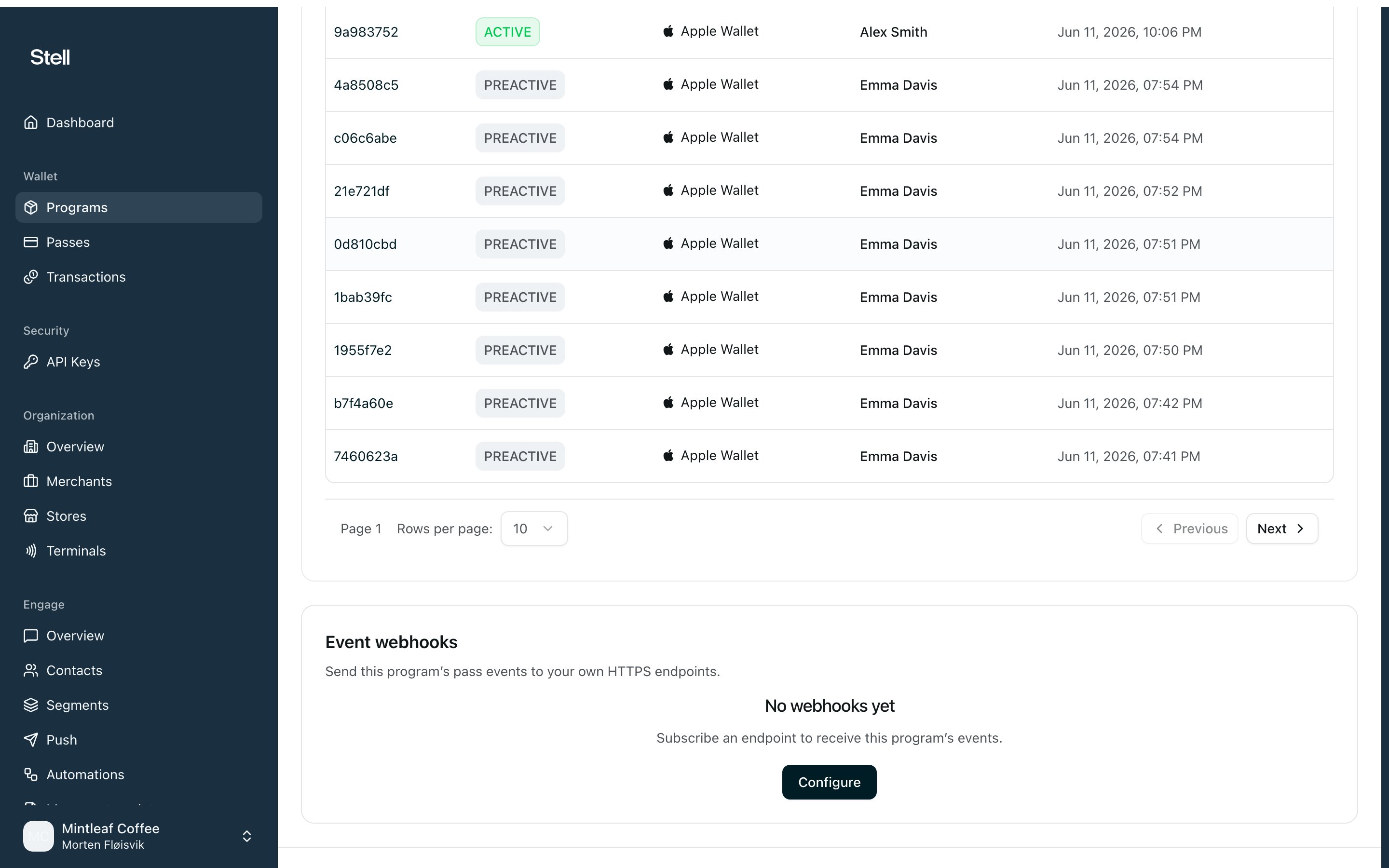
1. Open [your program](/programs/the-program-page) and find the **Event webhooks** card.
2. Click **Configure** (or **Manage**, if the program already has subscriptions), then **Add subscription**.
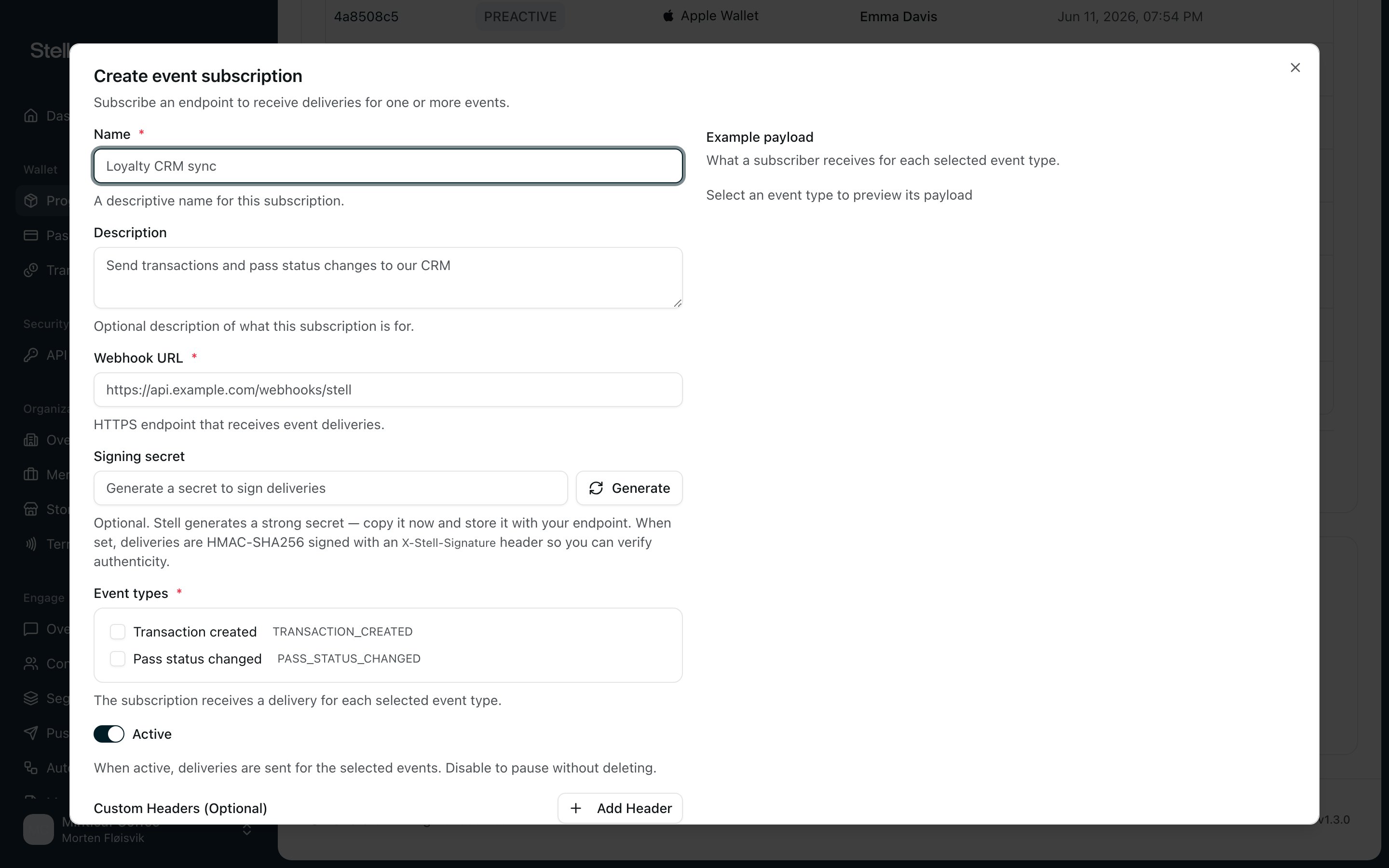
3. Give it a **Name** that says where the events go, for example "Loyalty CRM sync", and optionally a **Description**.
4. Enter the **Webhook URL**, the HTTPS endpoint that receives the deliveries.
5. Under **Signing secret**, click **Generate**, then **Copy**. Sharing this secret with your endpoint lets it verify that deliveries really come from Stell. This is optional, but recommended.
6. Tick the **Event types** the endpoint should receive. The **Example payload** panel next to the form shows exactly what your endpoint gets for each selected type.
7. Leave **Active** on.
8. If your endpoint requires authentication, add it under **Custom Headers**, described below.
9. Click **Create subscription**.
Three event types are available:
* **Pass status changed.** Fires each time a pass moves between [lifecycle states](/passes/lifecycle). The most common use is detecting enrollment: when a customer adds their pass to Apple Wallet or Google Wallet, the pass goes from `PREACTIVE` to `ACTIVE`, and that change fires the webhook.
* **Pass created.** Fires the moment a pass is issued, before the customer has added it to a wallet. Use it to mirror new passes into your own systems no matter where they were issued: the portal, an enrollment page, or the API.
* **Transaction created.** Fires when a transaction is recorded against a pass, for example an NFC tap at a terminal.
Subscriptions belong to a program. If you run several programs and want the same events from each, create a subscription on each program. The same endpoint URL works fine, and every delivery says which program it came from.
## Before you start
* **An HTTPS endpoint** that can receive POST requests. The URL must be public; plain HTTP, localhost, and private network addresses are rejected.
* **Which events you need.** For enrollment notifications, **Pass status changed** is enough.
* **Your endpoint's credentials**, if it requires them, for example a bearer token to send in an `Authorization` header.
This page covers setting up the subscription in the portal. Give whoever builds the receiving endpoint the [webhook deliveries](/api-reference/webhooks/deliveries) reference. It documents the exact requests Stell sends.
## Create a subscription
1. Open [your program](/programs/the-program-page) and find the **Event webhooks** card.
2. Click **Configure** (or **Manage**, if the program already has subscriptions), then **Add subscription**.
3. Give it a **Name** that says where the events go, for example "Loyalty CRM sync", and optionally a **Description**.
4. Enter the **Webhook URL**, the HTTPS endpoint that receives the deliveries.
5. Under **Signing secret**, click **Generate**, then **Copy**. Sharing this secret with your endpoint lets it verify that deliveries really come from Stell. This is optional, but recommended.
6. Tick the **Event types** the endpoint should receive. The **Example payload** panel next to the form shows exactly what your endpoint gets for each selected type.
7. Leave **Active** on.
8. If your endpoint requires authentication, add it under **Custom Headers**, described below.
9. Click **Create subscription**.
 Treat the signing secret like a password: store it with your endpoint's
configuration and share it only through a secure channel, never email or chat.
You can copy it again later from the edit dialog, and **Regenerate** replaces
it. After regenerating, update your endpoint or its signature checks will
start failing.
### Custom headers
Custom headers are sent with every delivery, typically your endpoint's authentication. Click **Add Header** and pick a preset:
* **Authorization**, for token auth. Enter the value your endpoint expects, for example `Bearer your-token-here`.
* **X-API-Key**, for endpoints keyed by API key.
* **Custom**, any header of your own, as long as its name starts with `X-`.
Only `Authorization` and `X-*` headers are allowed. Headers without a value aren't saved, and if two headers share a name, only the last value is kept.
## Manage subscriptions
Open **Manage** on the **Event webhooks** card to see the program's subscriptions. Each shows its name, event types, and an **Active** or **Inactive** badge.
* **Edit** changes anything about the subscription: name, URL, events, secret, headers. The program it belongs to can't be changed; create a subscription on the other program instead.
* **Pause** turns off the **Active** switch in the edit dialog. Deliveries stop, but the configuration is kept for when you switch it back on.
* **Delete** stops all event deliveries to the endpoint permanently. This can't be undone.
## Test your webhook
There's no test button. Verify with a real pass instead, which also proves the whole chain:
1. [Issue a pass](/passes/issuing) in the subscribed program, with your own details.
2. Add it to your wallet.
3. Adding the pass activates it, and that status change fires the webhook within moments. Check that your endpoint received the delivery.
Issuing a pass doesn't fire **Pass status changed**. The first delivery of
that type comes when the customer adds the pass to a wallet, and a pass that's
never added sends none. To catch the issuing moment itself, subscribe to
**Pass created**.
## If deliveries don't arrive
* **Right program?** The most common miss: the pass belongs to a different program than the one with the subscription.
* **Subscription Active**, with the right event type ticked?
* **Did a subscribed event actually happen?** Issuing a pass fires **Pass created** but not **Pass status changed**, which waits for the customer to add the pass to a wallet.
* **Does your endpoint answer with a 2xx status?** Failed deliveries are retried, then re-driven for up to roughly 24 hours. See [retries](/api-reference/webhooks/deliveries#retries-and-idempotency).
* **Expecting a header that isn't arriving?** Only `Authorization` and `X-*` custom headers are sent; anything else was dropped when the subscription was saved.
Still stuck? [Contact support](/support/contact). They can check the delivery attempts for your subscription.
Treat the signing secret like a password: store it with your endpoint's
configuration and share it only through a secure channel, never email or chat.
You can copy it again later from the edit dialog, and **Regenerate** replaces
it. After regenerating, update your endpoint or its signature checks will
start failing.
### Custom headers
Custom headers are sent with every delivery, typically your endpoint's authentication. Click **Add Header** and pick a preset:
* **Authorization**, for token auth. Enter the value your endpoint expects, for example `Bearer your-token-here`.
* **X-API-Key**, for endpoints keyed by API key.
* **Custom**, any header of your own, as long as its name starts with `X-`.
Only `Authorization` and `X-*` headers are allowed. Headers without a value aren't saved, and if two headers share a name, only the last value is kept.
## Manage subscriptions
Open **Manage** on the **Event webhooks** card to see the program's subscriptions. Each shows its name, event types, and an **Active** or **Inactive** badge.
* **Edit** changes anything about the subscription: name, URL, events, secret, headers. The program it belongs to can't be changed; create a subscription on the other program instead.
* **Pause** turns off the **Active** switch in the edit dialog. Deliveries stop, but the configuration is kept for when you switch it back on.
* **Delete** stops all event deliveries to the endpoint permanently. This can't be undone.
## Test your webhook
There's no test button. Verify with a real pass instead, which also proves the whole chain:
1. [Issue a pass](/passes/issuing) in the subscribed program, with your own details.
2. Add it to your wallet.
3. Adding the pass activates it, and that status change fires the webhook within moments. Check that your endpoint received the delivery.
Issuing a pass doesn't fire **Pass status changed**. The first delivery of
that type comes when the customer adds the pass to a wallet, and a pass that's
never added sends none. To catch the issuing moment itself, subscribe to
**Pass created**.
## If deliveries don't arrive
* **Right program?** The most common miss: the pass belongs to a different program than the one with the subscription.
* **Subscription Active**, with the right event type ticked?
* **Did a subscribed event actually happen?** Issuing a pass fires **Pass created** but not **Pass status changed**, which waits for the customer to add the pass to a wallet.
* **Does your endpoint answer with a 2xx status?** Failed deliveries are retried, then re-driven for up to roughly 24 hours. See [retries](/api-reference/webhooks/deliveries#retries-and-idempotency).
* **Expecting a header that isn't arriving?** Only `Authorization` and `X-*` custom headers are sent; anything else was dropped when the subscription was saved.
Still stuck? [Contact support](/support/contact). They can check the delivery attempts for your subscription.